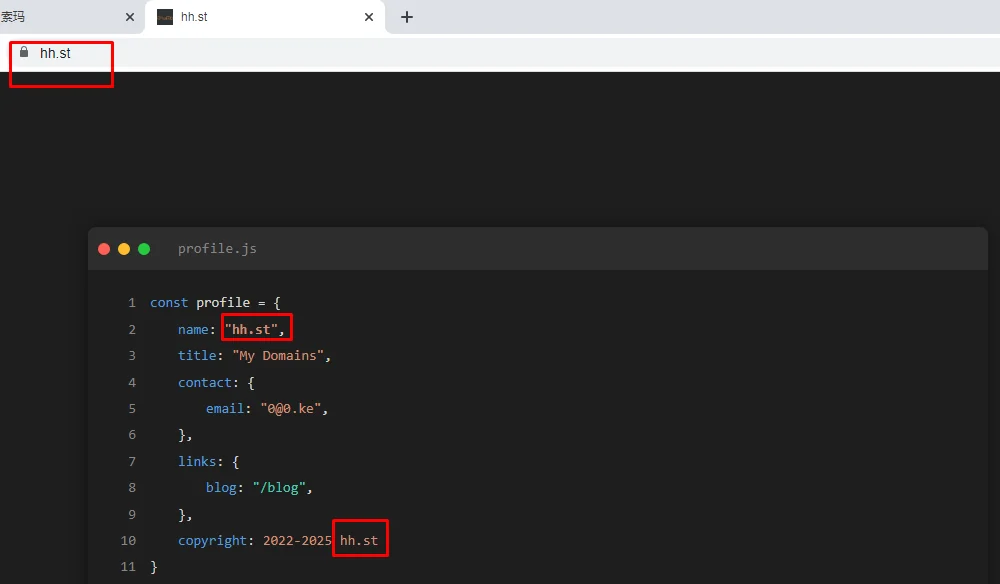
由于手里有一些域名闲置,准备都给挂单页停放。碰巧又偷到一个单页,看起来十分的简约,所以拿来直接就用上了。
但又考虑到:绑了多个域名的站点,不管从哪个域名访问,都会显示单页里写死的站点标题(网址)。我要的是从哪个域名入口,就显示哪个域名。所以在原有的基础上又做修改。
1
2
3
4
5
6
7
8
9
10
11
12
13
14
15
16
17
18
19
20
21
22
23
24
25
26
27
28
29
30
31
32
33
34
35
36
37
38
39
40
41
42
43
44
45
46
47
48
49
50
51
52
53
54
55
56
57
58
59
60
61
62
| <!DOCTYPE html>
<html lang="zh-cn">
<head>
<meta http-equiv="Content-Type" content="text/html; charset=UTF-8">
<meta name="viewport" content="width=device-width, initial-scale=1">
<title>域名</title>
<link rel="icon" href="https://suo.ma/favicon.ico">
<meta name="description" content="域名">
<link rel="stylesheet" href="./style.css">
<input type="hidden" id="_o_dbjbempljhcmhlfpfacalomonjpalpko" data-inspect-config="7">
<script type="text/javascript" src="chrome-extension://dbjbempljhcmhlfpfacalomonjpalpko/scripts/inspector.js"></script>
</head>
<body>
<div class="editor">
<div class="editor-header">
<span class="window-btn close"></span>
<span class="window-btn minimize"></span>
<span class="window-btn maximize"></span>
<span class="title-bar">profile.js</span>
</div>
<div class="editor-content">
<div class="line"><div class="line-content"><span class="keyword">const</span> profile = {</div></div>
<div class="line"><div class="line-content indent"><span class="keyword">name</span>: <span class="string">"域名"</span>,</div></div>
<div class="line"><div class="line-content indent"><span class="keyword">title</span>: <span class="string">"My Domains"</span>,</div></div>
<div class="line"><div class="line-content indent"><span class="keyword">contact</span>: {</div></div>
<div class="line"><div class="line-content indent-2"><span class="keyword">email</span>: <span class="string">"0@0.ke"</span>,</div></div>
<div class="line"><div class="line-content indent">},</div></div>
<div class="line"><div class="line-content indent"><span class="keyword">links</span>: {</div></div>
<div class="line"><div class="line-content indent-2"><span class="keyword">blog</span>: <span class="string"><a href="https://suo.ma/" target="_blank">"/blog"</a></span>,</div></div>
<div class="line"><div class="line-content indent">},</div></div>
<div class="line"><div class="line-content indent"><span class="keyword">copyright</span>: <span class="string">2022-<span id="year">2025</span> "</span></div></div>
<div class="line"><div class="line-content">}<span class="cursor"></span></div></div>
</div>
</div>
<script>
document.addEventListener('DOMContentLoaded', function() {
const domain = window.location.hostname;
document.title = document.title.replace('域名', domain);
document.querySelector('meta[name="description"]').content = domain;
const targets = document.querySelectorAll('.string');
targets.forEach(el => {
el.innerHTML = el.innerHTML.replace(/域名/g, `<strong>${domain}</strong>`);
});
const copyrightSpan = document.querySelector('#year').nextSibling;
if (copyrightSpan && copyrightSpan.nodeType === Node.TEXT_NODE) {
copyrightSpan.textContent = ` ${domain}`;
}
document.getElementById('year').textContent = new Date().getFullYear();
});
</script>
</body>
</html>
|
把原来的hh.st 都改为‘域名’二字,又加入了获取当前域名、替换字符、修改版权处域名的命令。从44.ke访问的时候,就会显示44.ke 。
后又考虑到域名是长期持有,服务器也是一直续费。又加入了自动更新版权处建站年份。
1
2
3
4
5
6
7
8
9
10
11
12
13
14
15
16
17
18
19
20
21
22
23
24
25
26
27
28
29
30
31
32
33
34
35
36
37
38
39
40
41
42
43
44
45
46
47
48
49
50
51
52
53
54
55
56
57
58
59
60
61
62
63
64
65
66
67
68
69
70
71
72
73
74
75
76
77
78
79
80
81
82
83
84
85
86
87
88
89
90
91
92
93
94
95
96
97
98
99
100
101
102
103
104
105
106
107
108
109
110
111
112
113
114
115
116
117
118
119
120
121
122
123
124
125
126
127
128
129
130
131
132
133
134
135
136
137
138
139
140
141
142
143
144
145
146
147
148
149
150
151
152
153
154
155
156
157
158
159
160
161
162
163
164
165
166
167
168
169
| :root {
--editor-bg: #1e1e1e;
--line-color: #858585;
--text-color: #d4d4d4;
--keyword-color: #569cd6;
--string-color: #ce9178;
--comment-color: #6a9955;
--number-color: #b5cea8;
--font-family: 'Consolas', 'Monaco', monospace;
}
* {
margin: 0;
padding: 0;
box-sizing: border-box;
}
body {
background-color: var(--editor-bg);
color: var(--text-color);
font-family: var(--font-family);
line-height: 1.6;
min-height: 100vh;
display: flex;
align-items: center;
justify-content: center;
padding: 20px;
}
.editor {
width: 100%;
max-width: 900px;
margin: 0 auto;
background: var(--editor-bg);
border-radius: 8px;
box-shadow: 0 0 20px rgba(0,0,0,0.4);
}
.editor-header {
background: #2d2d2d;
padding: 10px;
border-radius: 8px 8px 0 0;
display: flex;
align-items: center;
gap: 8px;
}
.window-btn {
width: 12px;
height: 12px;
border-radius: 50%;
}
.close { background: #ff5f56; }
.minimize { background: #ffbd2e; }
.maximize { background: #27c93f; }
.title-bar {
color: #858585;
margin-left: 20px;
font-size: 0.9em;
}
.editor-content {
padding: 20px;
counter-reset: line;
font-size: 14px;
overflow-x: auto;
}
.line {
display: flex;
padding: 2px 0;
position: relative;
min-height: 1.6em;
}
.line::before {
counter-increment: line;
content: counter(line);
color: var(--line-color);
width: 2em;
text-align: right;
padding-right: 1em;
position: absolute;
}
.line-content {
padding-left: 3em;
width: 100%;
}
.indent { margin-left: 2em; }
.indent-2 { margin-left: 4em; }
.keyword { color: var(--keyword-color); }
.string { color: var(--string-color); }
.comment { color: var(--comment-color); }
.number { color: var(--number-color); }
a {
color: #4ec9b0;
text-decoration: none;
transition: color 0.2s;
}
a:hover {
color: #66d9cb;
text-decoration: underline;
}
.cursor {
display: inline-block;
width: 2px;
height: 1.2em;
background: #fff;
margin-left: 2px;
animation: blink 1s step-end infinite;
vertical-align: middle;
}
@keyframes blink {
50% { opacity: 0; }
}
@media (max-width: 768px) {
body {
padding: 10px;
}
.editor {
width: 100%;
margin: 0;
font-size: 14px;
}
.editor-content {
padding: 15px 10px;
}
.line-content {
padding-left: 2.5em;
}
.indent { margin-left: 1.5em; }
.indent-2 { margin-left: 3em; }
.title-bar {
font-size: 0.8em;
margin-left: 10px;
}
.window-btn {
width: 10px;
height: 10px;
}
}
@media (max-width: 320px) {
.editor-content {
font-size: 12px;
}
.indent { margin-left: 1em; }
.indent-2 { margin-left: 2em; }
}
|